Previous: config.yml Explained · Next: Commands & Permissions
🗡️ Attribute System (Native Attributes + Hands-on Custom Tutorial)
QCL ships with a native attribute backend: even with no attribute plugin installed (AttributePlus / MythicLib, etc.) you get the full set of attributes and damage resolution — attack, crit, defense, dodge, elemental damage, and more. The entire ecosystem (QI items / QS skills / QC classes / QSt strengthen / QF forge) reads attributes from this one place in QCL, with per-source stacking: items, classes, gems, and sets each count as one "source", and same-named attributes add up automatically.
This page covers three things: how attributes are organized, what built-in attributes exist, and how to write your own attribute from scratch (.yml + JS script).
1. First, remember: three files, each with one job (the easiest thing to mix up)
| File | What it controls | After editing |
|---|---|---|
attributes.yml (plugin root) | Function: add attributes, categories, damage types, JS hooks, min/max bounds, combat-power weight | /qcl reload |
lang/en_US/attributes.yml | Display: each attribute's display name display_name / icon prefix / unit suffix | /qcl reload then /qi refresh |
lang/attributes.yml (root) | Base layer: write the icon prefix / unit suffix once here, shared by all attributes | same as above |
elements.yml | Element system: each element auto-generates three attributes (X Damage / X Bonus / X Resistance) | /qcl reload |
⚠️ Want to change an attribute's displayed name / add a resource-pack icon? It's NOT in
attributes.yml!attributes.ymlonly controls "this attribute exists and how it joins combat"; what it looks like lives inlang/.
Where display config lives
- Display name
display_name: inlang/en_US/attributes.yml. - Icon
prefix/ unitsuffix: set once in the rootlang/attributes.yml, shared by all attributes.
At load time the root lang/attributes.yml is the base, and lang/en_US/attributes.yml overrides it field by field (display name from the latter wins; icon/unit inherited from the base).
2. Built-in attribute table
Built-in attributes are hardcoded in the plugin and need no declaration in attributes.yml — just write their English key on an item / class / mob. Run /qcl attr list in-game to see them all.
📌 Probability attributes are always
0~1decimals (0.2= 20%), not whole-number percents! When the displaysuffixcontains%, the value is auto-multiplied by 100 (stored0.2→ shown20%), so don't pre-convert.
| Category | Attribute key | Display name | Notes |
|---|---|---|---|
| Base | attack_damage | Attack Damage | maps to vanilla melee |
| Base | attack_speed | Attack Speed | maps to vanilla attack speed |
| Physical | physical_damage | Physical Damage(%) | scales physical damage |
| Physical | physical_crit_rate | Physical Crit Rate(%) | max 1.0 |
| Physical | physical_crit_damage | Physical Crit Damage(%) | crit multiplier |
| Physical | armor_penetration | Armor Penetration | |
| Physical | projectile_damage | Projectile Damage(%) | bow/crossbow/thrown |
| Magic | magic_attack / magic_damage | Magic Attack / Magic Damage(%) | |
| Magic | magic_crit_rate / magic_crit_damage | Magic Crit Rate(%) / Magic Crit Damage(%) | |
| Magic | magic_penetration | Magic Penetration | |
| Skill | skill_attack / skill_damage | Skill Attack / Skill Damage(%) | |
| Skill | skill_crit_rate / skill_crit_damage | Skill Crit Rate(%) / Skill Crit Damage(%) | |
| True | true_attack / true_damage | True Damage / True Damage Bonus(%) | pierces defense |
| Environment | pvp_damage / pve_damage | PvP / PvE Damage(%) | vs players / mobs |
| Environment | pvp_defense / pve_defense | PvP / PvE Defense(%) | |
| Mitigation | defense | Defense | ships with defense.js: 100 def ≈ 50% reduction |
| Mitigation | damage_reduction | Damage Reduction(%) | max 0.9, scripted |
| Mitigation | dodge | Dodge(%) | max 1.0, dodge.js chance to fully avoid |
| Mitigation | block_rate | Block Rate(%) | block.js |
| Mitigation | parry | Parry(%) | parry.js |
| Mitigation | crit_resist | Crit Resistance(%) | max 1.0 |
| Mitigation | armor / armor_toughness | Armor / Armor Toughness | maps to vanilla |
| Mitigation | knockback_resistance | Knockback Resistance(%) | maps to vanilla |
| Resource | health | Health | maps to vanilla max_health |
| Resource | health_regen | Health Regen | |
| Resource | max_mana / mana_regen | Max Mana / Mana Regen | feeds QS/QC mana pool |
| Resource | max_stamina / stamina_regen | Max Stamina / Stamina Regen | |
| Common | movement_speed / max_absorption / luck | Movement Speed / Max Absorption / Luck | maps to vanilla |
| Misc | lifesteal | Lifesteal(%) | ships with lifesteal.js |
| Misc | spell_vampirism / reflection | Spell Vampirism(%) / Reflection(%) | |
| Misc | cooldown_reduction / exp_bonus / loot_bonus / money_bonus | Cooldown / EXP / Loot / Money Bonus(%) | |
| Misc | attack_knockback | Attack Knockback | maps to vanilla |
Element attributes (fire/water/thunder/wind/earth/metal/wood/light…) are driven by elements.yml; each element auto-generates <element> Damage / <element> Bonus / <element> Resistance. See section 6.
Query commands
| Command | What it does |
|---|---|
/qcl attr list | List all registered attributes (grouped by category) |
/qcl attr show [player] | View a player's current attribute totals (summed across sources) |
/qcl attr debug | Toggle "hit damage tracing" — prints the resolution each time you deal/take damage |
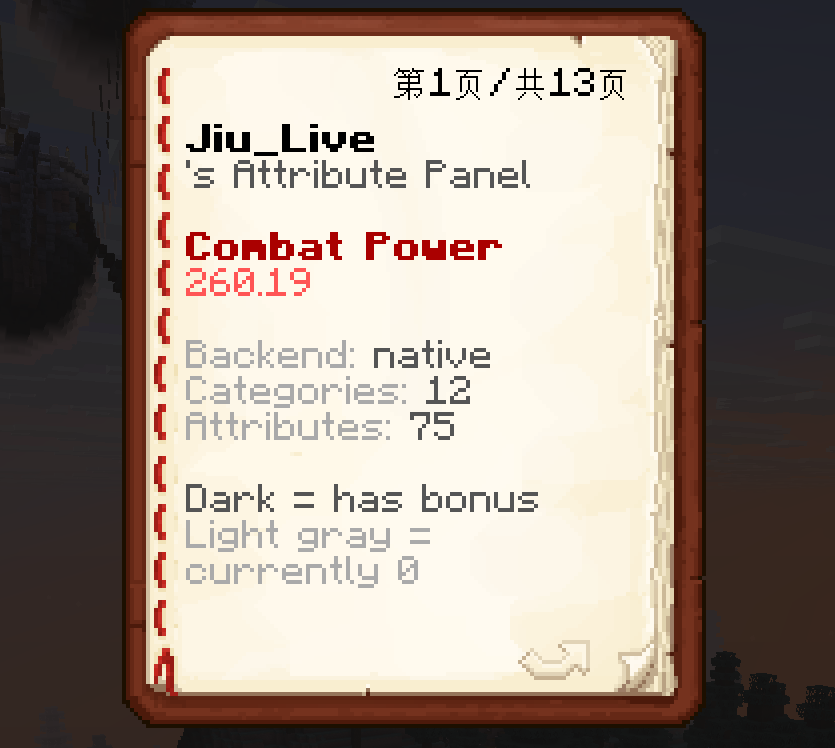
/qcl attr book | Open the attribute panel book |
/qcl mobattr <key> <value> | Set an attribute on the mob you're looking at (fastest way to test a custom attribute) |
3. Hands-on tutorial: write your own attribute
The three scenarios below go from easy to advanced. No source edits, no restart — once written, /qcl reload and it's live.
Scenario A: pure vanilla mapping (simplest, zero scripts)
Want a "Swiftness" attribute that's essentially vanilla movement speed? Just add to attributes.yml:
attributes:
  swiftness:
    display: Swiftness
    vanilla: movement_speed   # maps to vanilla speed; QCL applies a vanilla AttributeModifier automatically
/qcl reload → done. Now any item/class that writes swiftness grants speed. Mappable vanilla keys: max_health movement_speed armor armor_toughness attack_speed attack_damage knockback_resistance luck max_absorption, etc.
Scenario B: an attribute with a JS effect (full example · Thorns)
Goal: "Thorns" — when you take damage, reflect a portion back to the attacker. Needs 3 files working together.
Step 1️⃣ Write the JS script
Create plugins/QinhCoreLib/scripts/attributes/thorns.js:
// Hook: on_damage_taken — when the player takes damage
// Available variables:
//   ctx.get("damage")          current damage value
//   ctx.get("value")           player's total thorns (0~1, 0.2 = reflect 20%)
//   ctx.get("attacker")        attacker entity (may be null, e.g. fall/fire)
//   qcl.damage(entity, amount) deal damage to an entity
function onDamageTaken() {
    var damage   = ctx.get("damage");
    var thorns   = ctx.get("value");
    var attacker = ctx.get("attacker");
    if (thorns > 0 && damage > 0 && attacker) {
        qcl.damage(attacker, damage * thorns);  // reflect a thorns-fraction back
    }
    return damage;   // don't change the damage we take; return it as-is
}
💡 A script must
returna number (the processed damage). The return value ofon_damage_dealt/on_damage_takenbecomes the new damage; if you don't want to change it,return ctx.get("damage").
Step 2️⃣ Register it in attributes.yml
attributes:
  thorns:
    display: Thorns         # display name (can also live only in lang/, see Step 3)
    category: Mitigation    # the group in /qcl attr list
    order: 100              # hook execution order, smaller runs first; reflect/lifesteal go later
    hooks:
      on_damage_taken: qinhcorelib:attributes/thorns.js:onDamageTaken
The reference format is always qinhcorelib:attributes/<filename>.js:<functionName>.
Step 3️⃣ Configure display (optional, but recommended)
Add to lang/en_US/attributes.yml:
thorns:
  display_name: "Thorns"
  prefix: ""        # resource-pack 16px glyph char, put your icon here
  suffix: "%"       # with % → value auto ×100: stored 0.2 shows 20%
Step 4️⃣ Reload
/qcl reloadStep 5️⃣ Put the attribute on a player to test
An attribute is just a "definition" — to take effect it needs a source carrying it. Three common sources:
- QI item: write the English key in the item's
providers.ap.valueJSON, e.g.{"thorns":0.2}(20% reflect). - QC class: in
classes.yml'sstats:block writethorns: { base: 0.1, per-level: 0.005 }. - Quick test (mob): look at a mob →
/qcl mobattr thorns 0.5→ let it hit you and watch the reflect.
Verify: /qcl attr show to see your thorns total; /qcl attr debug prints the resolution each time you take a hit.

Scenario C: override a built-in attribute (rename / add icon, English key unchanged)
Want "Physical Crit Rate" to display as "Crit" with a resource-pack icon on items? Don't touch the key — just write the fields you want to change in attributes.yml; the rest (category/damage type/combat power) is inherited from the built-in:
attributes:
  physical_crit_rate:
    display: Crit
    prefix: ""        # your resource-pack 16px glyph char
The English key stays physical_crit_rate (items/classes still use it); only the display changes. This matches MMOItems' behavior.
4. Full attributes.yml field table
| Field | Purpose | Default |
|---|---|---|
display | Display name (can also live in lang/, recommended) | = key |
prefix | Display-name prefix (usually a resource-pack 16px glyph \uXXXX) | none |
category | Category (for /qcl attr list and the attribute GUI grouping; custom categories allowed) | Misc |
vanilla | Mapped vanilla attribute key (when set, uses a vanilla AttributeModifier) | none |
type | Damage type physical / magic / skill / true (for category-bonus attributes) | none |
mitigation | Whether it's a "mitigation" attribute (true → pierced by true damage, e.g. defense/damage reduction) | false |
combat-power | Combat-power weight (player power = Σ attribute value × weight) | 1.0 |
min / max | Value min/max clamp (balance tool, e.g. max: 1.0 for probabilities) | unbounded |
message | Combat message to the player on trigger (supports {damage} {value} placeholders) | none |
order | Hook execution order, smaller runs first (crit=10, reflect/lifesteal ~100) | |
hooks | JS hooks: event name → script reference | none |
Hook events
| Event | When | Script return |
|---|---|---|
on_damage_dealt | when the player deals damage | new damage value |
on_damage_taken | when the player takes damage | new damage value |
on_kill | when killing an entity | — |
on_tick | every 20 ticks (requires QI to call refreshEquipHooks at the end of its equipment scan) | — |
on_equip | when equipping an item carrying the attribute | — |
on_unequip | when unequipping | — |
Interfaces available in scripts
ctx = current context, qcl = utility API:
| Call | Purpose |
|---|---|
ctx.get("damage") | current damage (includes crit and earlier hook results) |
ctx.get("value") | this attribute's player total (already summed across sources) |
ctx.get("attacker") / ctx.get("victim") | attacker / victim entity (may be null) |
ctx.get("<any attr key>") | read any other attribute value of the player |
ctx.set(key, value) | write a context value |
qcl.heal(amount) | heal self (auto-clamped to max health) |
qcl.damage(entity, amount) | deal damage to an entity |
qcl.addPotion(entity, "SLOWNESS", ticks, amplifier) | apply a potion effect |
qcl.placeholder(text) / qcl.logInfo(msg) / qcl.itemGive(ref, amount) | resolve PAPI / log / give item |
Built-in example scripts are in
scripts/attributes/:thorns.js(reflect),lifesteal.js,defense.js(mitigation curve),dodge.js,block.js,parry.js,damage_reduction.js,critical_rate.js. Copy and tweak.
5. The attribute backend is switchable
config.yml's attribute.backend:
| Value | Meaning |
|---|---|
native (default) | QCL's built-in native attribute backend, no attribute plugin required |
attributeplus | hand attributes to AttributePlus (requires AP, registered by QinhItems) |
auto | prefer an available third-party backend, else fall back to native |
The whole ecosystem reads the backend from here — no per-plugin config. /qcl reload after editing.
6. Element system
elements.yml: each element auto-generates 3 attributes (visible in /qcl attr list, declarable on items/classes):
<element> Damage: flat element damage added to your attacks<element> Bonus: %, amplifies that element's damage<element> Resistance: %, reduces that element's incoming damage (0~1)
Resolution formula: element damage = Σ( <element>Damage × (1+<element>Bonus) × (1-target <element>Resistance) × counter multiplier ). Element damage pierces physical defense/mitigation, but is reduced by the matching element resistance, and is still subject to dodge/block/parry.
Mutual generation & restraint (Wu Xing): restrains lists "who I counter". Countering deals ×restraint-bonus (default 1.5), being countered ×(2-bonus), unrelated ×1. A target's "innate element" = the element it has the highest resistance to.
restraint-bonus: 1.5
elements:
  fire:
    name: Fire
    color: "&c"
    restrains: [metal]   # fire counters metal
  # …add/remove elements / change the restraint chain freely
7. Common pitfalls
- Wrote a probability as an integer: crit rate / dodge must be a
0~1decimal (0.3= 30%); writing30gets clamped to 100% bymax: 1.0. - Edited the wrong file for the display name: display name / icon live in
lang/en_US/attributes.yml, not the rootattributes.yml. - Double
suffixconversion: asuffixcontaining%already ×100s the value — don't multiply again. - Script returns nothing: an
on_damage_*script mustreturna number; omitting it makes damageundefined. - Edited but no effect:
attributes.yml/scripts need/qcl reload; item display needs another/qi refreshto re-render. - Element resistance direction: resistance reduces incoming damage, and the innate element is decided by the highest resistance — stacking one element's resistance on a mob makes that its "innate" element.